
Every part of your workshop, connected
From the front desk to the workshop floor and the accounts office, AutoXpedite brings bookings, jobsheets, technician time, invoicing and reporting together in one secure cloud system, with clear next steps at every stage of the job.
Book a demoExplore features
What AutoXpedite covers
Jobsheet Manager
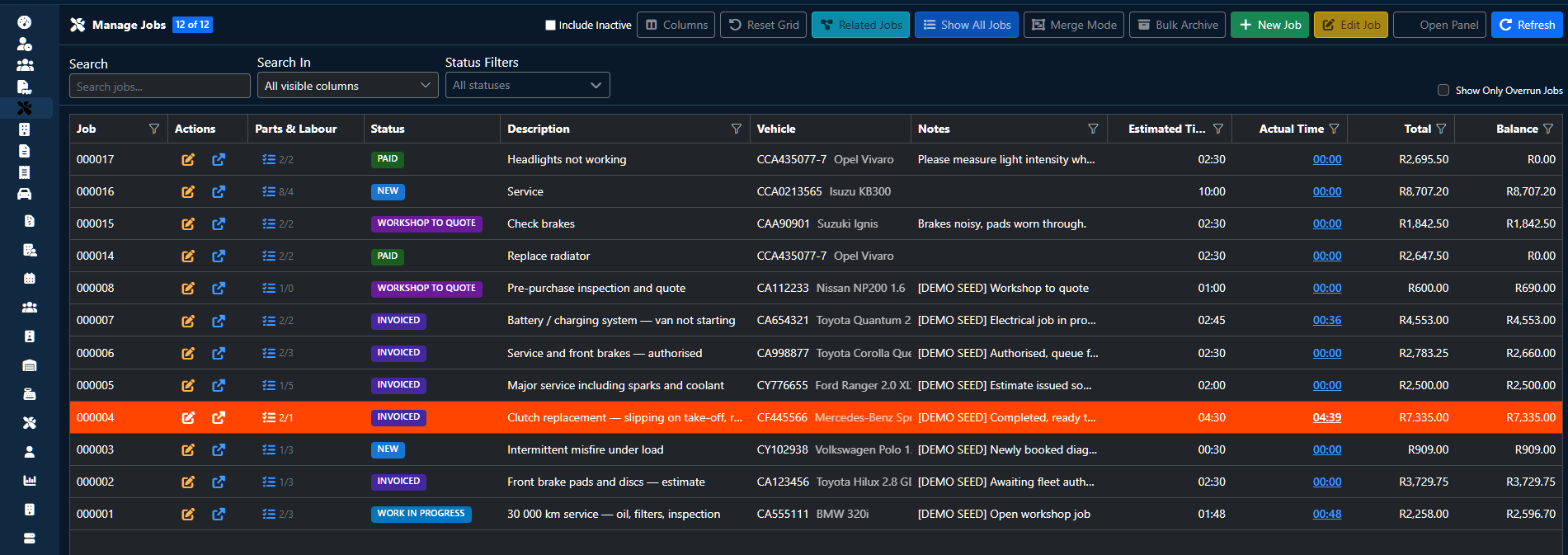
One live list of workshop jobs by status — so advisors and managers can see what is new, waiting for quote, waiting for authorisation, in progress or ready to invoice, and open the next job without switching systems.
Tap the image to open full size

One guided path from new job to paid
Every job lives on a single jobsheet: customer, vehicle, work description, labour, parts and status. Your team always knows what happens next.
Front desk, workshop and accounts work from the same live job.
Status that follows the work
Jobs move from new, through workshop assessment, service advisor pricing and customer authorisation, into the work and on to invoicing and payment.
Guided next steps
A workflow prompt helps advisors and technicians choose the right next step instead of leaving jobs in limbo.
Adapted to your workshop
Administrators can refine the guidance staff see, so the system matches how you already work.
A clear job history
Each job keeps a record of how it moved forward, which supports accountability across the team.

Jobs that wait get followed up
When a job sits too long at a key stage, AutoXpedite prompts the people who should act, and managers can review the response.
Follow-up reports show managers what was recorded when staff were prompted.
New Jobs
A prompt when a newly captured job has not been picked up.
Workshop To Quote
A prompt when a job is waiting for the workshop to identify the labour and parts required and submit the jobsheet to a service advisor for pricing.
Waiting Authorisation
A prompt when an estimate is waiting for the customer's go-ahead.
Your timing, your people
Choose how long is too long, who is prompted and whether a response is required. Rules can differ per customer where needed.

Quote clearly and keep to the agreed scope
The workshop identifies the labour and parts needed; service advisors price the work, complete the estimate and submit it to the customer for authorisation before work begins.
A clear record of what was quoted and what was approved.
Preview, then finalise
Check the estimate before it is issued; the finalised version is kept exactly as the customer saw it.
Sent in your wording
Email estimates with your company's own message, with an optional advisor signature.
Authorisation lock
Once authorised, the job's labour and parts are locked. A controlled, recorded unlock is available when a genuine change is needed.
Workshop identifies, advisor prices
Workshop staff complete the labour and parts sections of the jobsheet and submit it to a service advisor, who prices the work and completes the estimate.

A front desk that feeds the workshop
Customer accounts, divisions, vehicles and bookings stay together, so every job starts with the right details.
Capture details once and use them from booking through to invoice.
Bookings diary
Pending, today, week and month views for booked jobs and walk-ins; accept or decline requests cleanly.
Digital vehicle check-in
Record fuel level, work instructions and existing damage on a vehicle diagram, with arrival photos and a printable check-in sheet.
Customer accounts and divisions
Payment terms, contacts, divisions and order numbers for fleet, contract and multi-site customers.
Vehicle history
Each vehicle keeps its service history and ownership changes, linked to its jobs.

Actual hours against the quote
Technicians clock onto labour tasks as they work, so managers can compare actual with estimated time while the job is still in the workshop.
Better information for planning, estimating and billing labour.
Clocking per task
Start and stop against labour lines from a tablet or PC, and see who is clocked on across the floor.
Overruns highlighted
Jobs running over their estimated hours stand out early.
Daily productivity
Reporting that brings together attendance, job time and idle time for workshop technicians.
Detailed time reports
Job clocking reports for a closer look at how time was spent.

Know who is on site
Staff clock attendance and breaks separately from job time, giving managers a clear view of hours on site.
Fewer surprises at the start of the day and cleaner figures at payroll time.
Attendance and breaks
Record work time, including tea and lunch breaks, kept separate from time on jobs.
MISSING clock-in alerts
Chosen managers are alerted by email when an expected staff member has not clocked in, at a check time your company sets.
Planned absences
Record leave in advance so absent staff are not flagged as missing.
Attendance reports
Work, break and payroll-hours summaries, including missed days.

Tax invoices, receipts and statements that agree
Turn completed work into VAT-aware tax invoices in Rands, record payments against them and send statements from the same customer account.
VAT-aware tax invoices
Documents follow tax invoice requirements for VAT-registered companies.
Receipts and credit notes
Allocate payments to the right invoices and issue credit notes where needed.
Customer statements
Statements drawn from the same account your accounts team works in.
Document Archive
Estimates and invoices are archived as issued, so later job edits do not change past documents.
Accounting file export
Export files prepared for import into your accounting package, with export history for re-download.

See how the business is performing
A practical report set for owners, workshop managers and accounts, without maintaining a side spreadsheet.
Decisions based on the same figures the team works with every day.
Live dashboard
Jobs by status and company messages; select a status to open the matching job list.
Revenue and job profitability
Revenue and job income versus labour and parts cost for the period you choose.
Jobsheet summary
Job volumes, values and outstanding work at a glance.
Customer and supplier views
Customer activity and balances, and spend by supplier.
Contract and multi-payer billing
Special functions for contract customers and jobs where costs are shared between more than one payer.
Merged Jobs
Contract and PO numbers on estimates and invoices, plus merged invoicing when an adjusted PO covers several Jobsheets. Individual invoices stay in the Document Archive.
Learn more →Split Jobs
Allocate Jobsheet items to different customers or divisions – for example warranty, breakdown insurance and the owner – and generate a separate invoice for each.
Learn more →Want to see the output? View sample check-in, estimate, invoice and statement PDFs →

Parts on the job, with optional depth
Suppliers and a parts catalogue support job costing as standard. Add stock control or counter sales when your business needs them.
Optional modules are discussed during your demo; see Pricing.
Parts on the job
Book parts to the job as the work is done, with supplier details for purchase reporting.
Inventory OPTIONAL
Stock on hand, purchase orders and goods received, price requests for parts not held, returns and stock takes.
Cash Sales OPTIONAL
Sell parts and items over the counter, with payment and invoice, without opening a jobsheet.
Start simple
Begin with the parts catalogue and add optional modules when you are ready.

Your rules, your people, your data
Company administrators decide how AutoXpedite works for the business, and each person sees the screens their role needs.
Roles and permissions
Front desk, technicians, managers and accounts each get a menu suited to their work.
Flexible company settings
Logos, VAT details, document notes and numbering, email wording, chase prompts, workflow guidance and alert recipients.
Your own secure company
Each workshop works in its own secure company space; your customers, jobs and invoices stay yours.
Nothing to install
Sign in from a browser on a PC, tablet or phone. VAT and Rands are built in.
Want to see it working?
We will walk you through the full job workflow in a personal demo.
Book a demoor call +27 81 470 5551